G600 Mouse Keybind

Chicharron
✭✭✭✭✭
✭
✭
How do you keybind the buttons?

This is mine.
Mousewheel Up - Weapon Swap
G7 - Inventory
G9 to G13 - Skills
G15 - Destroy Item
G16 - Prevent Attacking Innocents On/Off
G17 - Cycle Focused Quest
G18 - Map
G19 - Mount
G20 - Journal
This is mine.
Mousewheel Up - Weapon Swap
G7 - Inventory
G9 to G13 - Skills
G15 - Destroy Item
G16 - Prevent Attacking Innocents On/Off
G17 - Cycle Focused Quest
G18 - Map
G19 - Mount
G20 - Journal
1
-
ChimpyChumpy✭✭✭I'm resurrecting this because I can't bind the keys for the same mouse. how exactly do you do it? doesn't work in game or with g hub and I've tried LGS and can't even figure out how to add eso to it.0
-
 ChefZero✭✭✭✭Playing with my Razer Naga for ten years now and still love it. RMB doesn't work well anymore
I put most combat stuff on my mouse so my fingers can be on WSAD. IMO Naga is better than G600 because the positioning of G7 and G8 buttons are bad.Edited by ChefZero on June 22, 2019 6:45PMPC EU - DC only0 -
 zaria✭✭✭✭✭
✭✭✭✭✭1-5 is skills 6 is ultimate, weapon swap on mouse button tilt R and L so I can duple tap in high lag environment or not knowing who bar im on like on res.
7-9 is for special functions like rotate consumable, the last is to high up to use conferrableGrinding just make you go in circles.
Asking ZoS for nerfs is as stupid as asking for close air support from the death star.0 -
zaria✭✭✭✭✭
✭✭✭✭✭
You need the driver, its independent of game, then open the program on bar and program it.ChimpyChumpy wrote: »I'm resurrecting this because I can't bind the keys for the same mouse. how exactly do you do it? doesn't work in game or with g hub and I've tried LGS and can't even figure out how to add eso to it.
Grinding just make you go in circles.
Asking ZoS for nerfs is as stupid as asking for close air support from the death star.0 -
Chicharron✭✭✭✭✭
✭ChimpyChumpy wrote: »I'm resurrecting this because I can't bind the keys for the same mouse. how exactly do you do it? doesn't work in game or with g hub and I've tried LGS and can't even figure out how to add eso to it.
I do not know what you mean, i just install the software to turn off the mouse lights and then uninstall it.
These are the default keys of the mouse.
From G9 to G20 - 1234567890'¡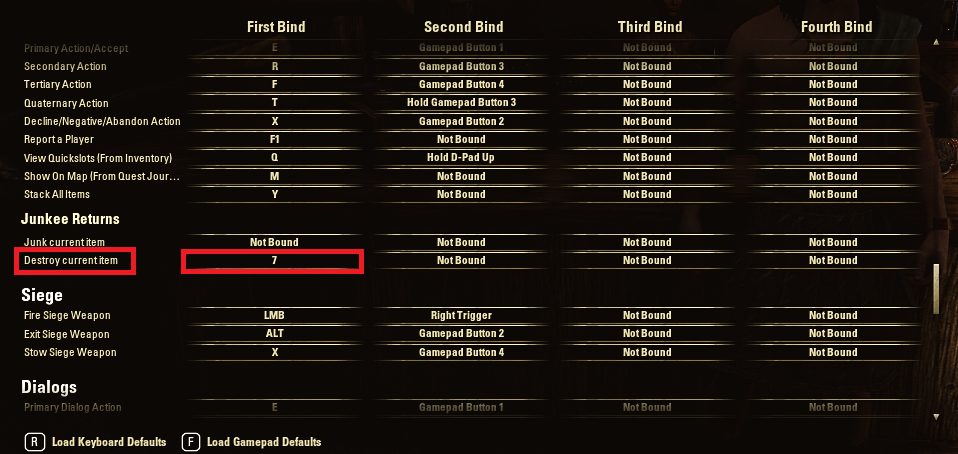
7 = G15
Edited by Chicharron on June 22, 2019 7:49PM0