Maintenance for the week of December 15:
· [COMPLETE] PC/Mac: NA and EU megaservers for maintenance – December 15, 4:00AM EST (9:00 UTC) - 12:00PM EST (17:00 UTC)
· [COMPLETE] Xbox: NA and EU megaservers for maintenance – December 15, 4:00AM EST (9:00 UTC) - 12:00PM EST (17:00 UTC)
· [COMPLETE] PlayStation®: NA and EU megaservers for maintenance – December 15, 4:00AM EST (9:00 UTC) - 12:00PM EST (17:00 UTC)
· [COMPLETE] PC/Mac: NA and EU megaservers for maintenance – December 15, 4:00AM EST (9:00 UTC) - 12:00PM EST (17:00 UTC)
· [COMPLETE] Xbox: NA and EU megaservers for maintenance – December 15, 4:00AM EST (9:00 UTC) - 12:00PM EST (17:00 UTC)
· [COMPLETE] PlayStation®: NA and EU megaservers for maintenance – December 15, 4:00AM EST (9:00 UTC) - 12:00PM EST (17:00 UTC)
NEED HELP: DirectX Critical Error

Magic_Doogies
✭✭✭
This isn't for me specifically but I am asking for a friend. I spent hours with him trying to resolve an issue where whenever he launches the game he gets an Direct X critical error and it tells him to update to the latest version.
The problem is that my friend is currently running DirectX 12 so we aren't sure why it's giving him this message. Pictured below are his specs:
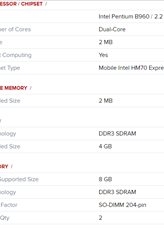
Thank you in advance for all the help.
I should also point out that my friend has also installed the whole game on his backup hard drive. So maybe that may play in to that.
The problem is that my friend is currently running DirectX 12 so we aren't sure why it's giving him this message. Pictured below are his specs:
Thank you in advance for all the help.
I should also point out that my friend has also installed the whole game on his backup hard drive. So maybe that may play in to that.
0
-
 Kaspar✭✭✭Try downloading and installing the DirectX Runtime Library.
https://microsoft.com/en-ca/download/details.aspx?id=350 -
Magic_Doogies✭✭✭Try downloading and installing the DirectX Runtime Library.
https://microsoft.com/en-ca/download/details.aspx?id=35
Thank you for the link but it's still not working for my friend.
I'm going to recheck to see if Direct X 12 has any known issues when it come to compatibility with ESO for I don't know any other reason for his laptop to not be able to run this game.
I would hate for the solution to be 'get a new video card' because that would mean that he would have to get an entirely new laptop to play one game. (He has played recent games from this year that worked fine on his computer.)0