Steam version Desktop Icon isn't suing the ESO Icon, Can't change it in Properties

maximusrex45
✭✭✭✭✭
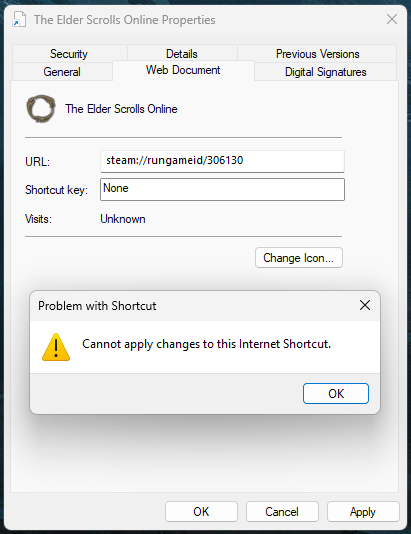
I have ESO on Steam, Steam is using the blank page icon instead of the ESO Ouroboros Icon, when I go into Properties and chose the right icon manually it won't let me change it (images below). Please fix this on Steam or provide directions on how I can force it to save my changes (I am already Admin on this machine).

0
-
 LootAllTheStuff✭✭✭✭✭Which version of windows? Found this for 10 but not sure if the suggested fix for 11 is valid:
https://steamcommunity.com/discussions/forum/1/4337599680238754517/
Edited by LootAllTheStuff on 11 December 2025 22:270 -
 SeaGtGruff✭✭✭✭✭
✭✭✭✭✭The following works for me on Windows 11:
(1) In Steam, right-click on The Elder Scrolls Online in your library, select "Manage," then select "Browse local files."
(2) In the "Zenimax Online" window, select "The Elder Scrolls Online" folder, select the "game" folder, then select the "client" folder.
(3) Right-click on the "eso64.exe" file and select "Copy as path."
(4) Close the window and go to your desktop.
(5) Right-click on the shortcut for The Elder Scrolls Online that you had added from Steam and select "Properties."
(6) Click the "Change Icon..." button.
(7) Right-click in the "Look for icons in this file:" field at the top of the popup window (which should be highlighted), Paste the path that you had copied in step (3), and press Enter.
(8) The icon should be highlighted, so click the "OK" button in the popup, then click the "OK" button in the first window.
I haven't looked at the link posted above, so I don't know if it describes the same way or an easier way.I've fought mudcrabs more fearsome than me!0 -
maximusrex45✭✭✭✭✭I found a fix.
It seems Windows 11 locks shortcuts that are in the Start Menu folder or subfolders so you can't edit them, I had to have Steam create a new Desktop Icon, fix the icon there, and then copy that fixed link into the start menu folder.1 -
SeaGtGruff✭✭✭✭✭
✭✭✭✭✭Thank you for updating your thread! I assume that locking the shortcut's properties isn't specific to either Steam or ESO, so if anyone ever creates a shortcut in their Start menu and then wants to change its properties, your last post tells them what they can do to get around the issue.I've fought mudcrabs more fearsome than me!0 -
LootAllTheStuff✭✭✭✭✭Well, that explains a problem I was having at work! Thanks for posting the info - it's so nice to have someone actually come back after solving their problem!0