Maintenance for the week of May 4:
• PC/Mac: No maintenance – May 4
• PC/Mac: No maintenance – May 4
Another solution for black screen while playing if you´re using laptop

Darkbahamuth
Soul Shriven
Hello.
I just feel like i must post this in case someone is having the same problem as me and has tried every solution google gives you when you search for "elder scrolls online black screen" and does not work.
I´m no expert so just try it and see if it works for you too.
The problem i´m refering to is when you are playing and in 5 or 10 minutes of play the screen freezes for a moment and then the black screen comes, you can hear your character running, jumping etc but that´s all.
So the solution in my case was to go to "energy options" - "advance settings" and change every slot refering to graphics to "energy save optimization/battery life" instead of "maximum performance", in my case there are 2 slots for graphics as the image below shows it (sorry it´s in spanish but you get the idea).
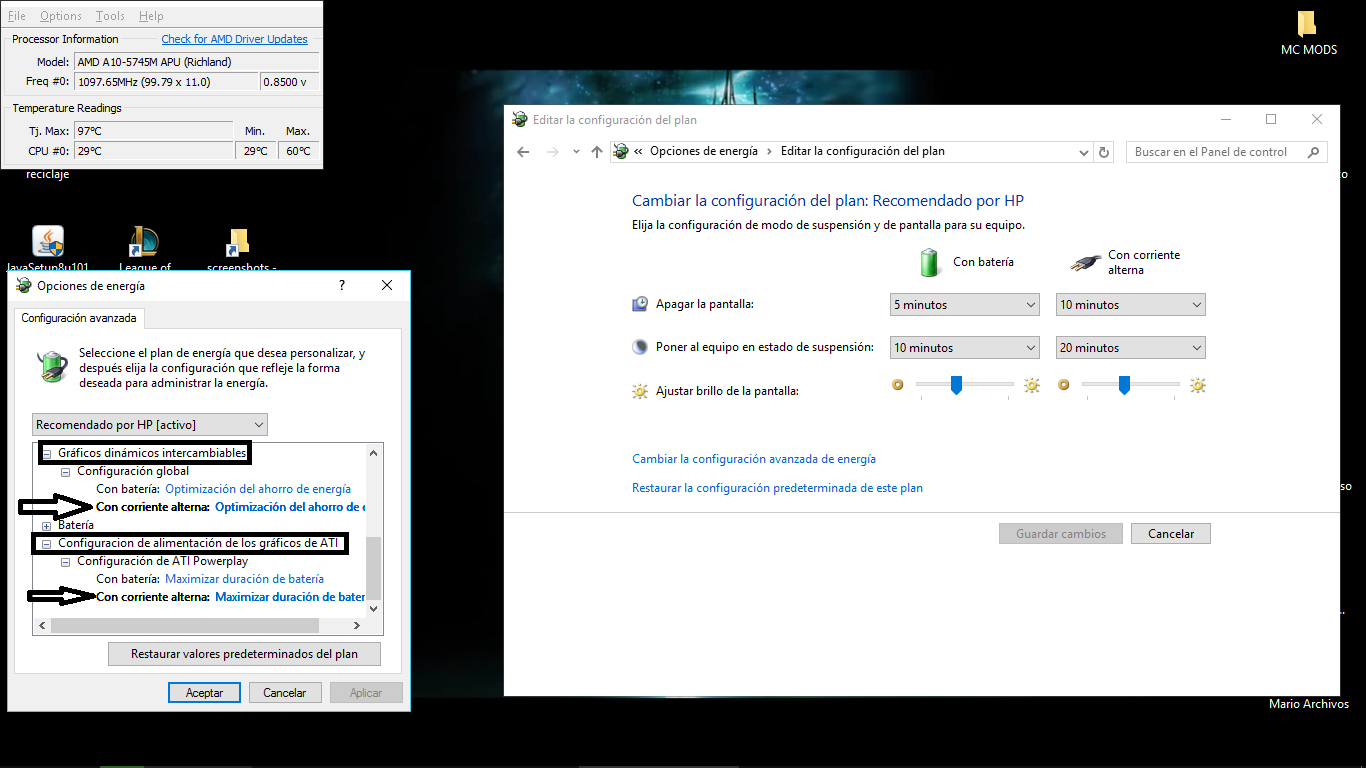
Again, as the title says, is for laptop users that are playing with the charger connected.
Others things that i did are:
- Running as administrator the launcher.
- Set the graphics settings in "default".
- Change the compatibility of the launcher to windows 7.
And that´s all, i been playing for periods of 2 and 3 hours and even i have leave the game running while im doing something else and not a single black screen since then.
So if your case is the same as mine, i hope that this help you too so you can play this awesome game.
Sorry for any spelling mistake.
I just feel like i must post this in case someone is having the same problem as me and has tried every solution google gives you when you search for "elder scrolls online black screen" and does not work.
I´m no expert so just try it and see if it works for you too.
The problem i´m refering to is when you are playing and in 5 or 10 minutes of play the screen freezes for a moment and then the black screen comes, you can hear your character running, jumping etc but that´s all.
So the solution in my case was to go to "energy options" - "advance settings" and change every slot refering to graphics to "energy save optimization/battery life" instead of "maximum performance", in my case there are 2 slots for graphics as the image below shows it (sorry it´s in spanish but you get the idea).
Again, as the title says, is for laptop users that are playing with the charger connected.
Others things that i did are:
- Running as administrator the launcher.
- Set the graphics settings in "default".
- Change the compatibility of the launcher to windows 7.
And that´s all, i been playing for periods of 2 and 3 hours and even i have leave the game running while im doing something else and not a single black screen since then.
So if your case is the same as mine, i hope that this help you too so you can play this awesome game.
Sorry for any spelling mistake.
1